

Casio module 3092: manual and setup (W-800H)
03.09.2026
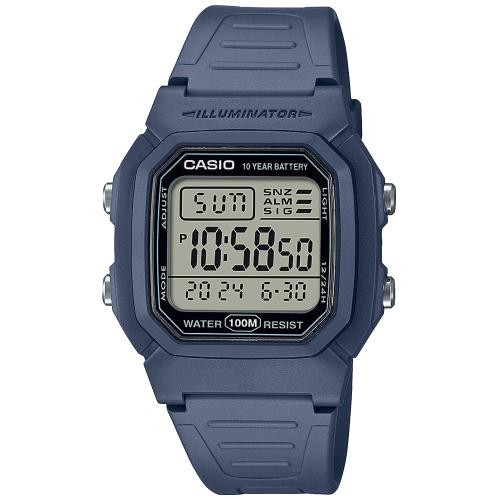
Casio module 3092: user manual and setup (W-800H)
The module number is printed on the case back of the watch, in a small rectangle next to the other markings. If it says 3092, the settings below apply to your watch. Casio uses the same module in different models, so the number is a more reliable guide than the model name.
According to the official manual, the procedures for modules 2499 and 3092 are identical. The illustrations in the Casio document show module 2499, but the steps are the same.
Which watches have module 3092

Watches with module 3092 are digital. The display shows hours, minutes, seconds, date and day of the week. Separate modes provide an alarm, hourly time signal, stopwatch and dual time. At Classic, the module is found in the W-800H series:
Buttons and modes
The manual labels the four buttons with the letters A, B, C and D. Their main functions are as follows:
- C changes modes. The order is: Timekeeping Mode, Alarm Mode, Stopwatch Mode, Dual Time Mode.
- Holding C for about two seconds in any mode returns the watch to the Timekeeping Mode.
- B turns on the display illumination in any mode.
- A opens the setting screens and toggles the alarm status.
- D changes values during setting and switches between 12-hour and 24-hour format.
In the Alarm, Stopwatch and Dual Time Modes, the current time is always shown in the lower part of the display.
How to set the time and date
- In the Timekeeping Mode, hold A until the seconds start to flash. This is the setting screen.
- Press C to move the flashing in the order: seconds, hour, minutes, year, month, day.
- While the seconds are flashing, press D to reset them to 00. If the seconds are between 30 and 59, the minutes increase by one.
- While the hour, minutes, year, month or day is flashing, press D to increase the value.
- Press A to exit the setting screen.
The day of the week is shown automatically according to the set date. The year can be set in the range from 2000 to 2099. The built-in automatic calendar accounts for the different lengths of the months and for leap years. Once you set the date, you only need to change it after replacing the battery.
To change the format, press D in the Timekeeping Mode. In 12-hour format, the P indicator appears to the left of the hour for times from 12:00 noon to 23:59. There is no indicator before noon. In 24-hour format, the time is shown from 0:00 to 23:59 without an indicator. The selected format applies to all modes.
Alarm and hourly time signal
The alarm lets you set the hour, minutes, month and day. It can sound once or as a snooze alarm, which repeats up to seven times at five-minute intervals. There is also a separate hourly time signal, which makes the watch beep twice every hour on the hour. In the Alarm Mode, button D switches between the alarm screen and the hourly time signal screen, which shows :00.
The alarm type depends on what you have set:
- Daily alarm: hour and minutes only. It sounds every day at the set time.
- Date alarm: month, day, hour and minutes. It sounds at the set time on the specific date.
- One-month alarm: month, hour and minutes. It sounds every day, but only during the set month.
- Monthly alarm: day, hour and minutes. It sounds every month on the set day.
Setting the alarm:
- In the Alarm Mode, press D to display the alarm screen.
- Hold A until the alarm hour starts to flash. This automatically turns on the one-time alarm.
- Use C to move the flashing in the order: hour, minutes, month, day.
- Use D to increase the flashing value.
- For an alarm without a month, set the x symbol instead of the month. It appears between 12 and 1.
- For an alarm without a day, set the xx symbol instead of the day. It appears after the last day of the month and before 1.
- In 12-hour format, check whether the hour is morning or afternoon by the P indicator.
- Press A to exit the setting screen.
The alarm sounds for about 10 seconds. The snooze alarm repeats up to seven times at five-minute intervals. Pressing any button stops the sound. The alarm and the hourly time signal sound in all modes.
To select the alarm type, press D in the Alarm Mode, then press A. The order is: alarm off, one-time alarm, snooze alarm. The alarm on indicators are visible in all modes. The snooze indicator flashes during the five-minute pauses between alarms. Opening the setting screen automatically returns the type to one-time alarm.
To stop an active snooze alarm, press D and then A in the Alarm Mode. This turns the alarm off or selects the one-time alarm. If you want snooze again, you must select it again as the alarm type.
To test the alarm, hold D in the Alarm Mode. For the hourly time signal, press D to reach the screen showing :00 and use A to turn it on or off. The hourly time signal on indicator is visible in all modes.
Stopwatch
The stopwatch measures elapsed time, split times and two finishes. The range is 23 hours, 59 minutes and 59.99 seconds. After reaching the limit, the count continues from zero until you stop it. Measurement continues even if you exit the mode. If you exit while a split time is frozen on the display, it is cleared and the elapsed time is shown. Enter the mode with C.
- Elapsed time: start, stop, restart, stop, reset.
- Split time: start, split (SPL is shown), split release, stop, reset.
- Two finishes: start, split at the first finish, stop at the second, split release for the second time, reset.
Dual Time
The Dual Time Mode shows the time in another time zone. Its seconds are synchronized with the seconds of the Timekeeping Mode.
- Press C until you enter the Dual Time Mode.
- Hold A until the hour starts to flash.
- Use C to switch between hour and minutes.
- Use D to increase the value.
- Press A to exit the setting screen.
Display illumination
Press B in any mode to illuminate the display.
Automatic exit from setting
If you leave a screen with flashing digits for two to three minutes without any action, the watch automatically exits the setting screen.
The original Casio manual (PDF)
Casio module 3092 manual (PDF, English). This is the official Casio document with illustrations of the buttons and the display.
Casio at Classic. Browse all Casio watches at Classic or the manuals for all Casio modules. You can see the watches in person at Boutique CLASSIC on Knyaz Boris I 32 and at Mall Varna in Varna, Bulgaria.