

Casio module 3246: manual and setup (GST-B400)
03.09.2026
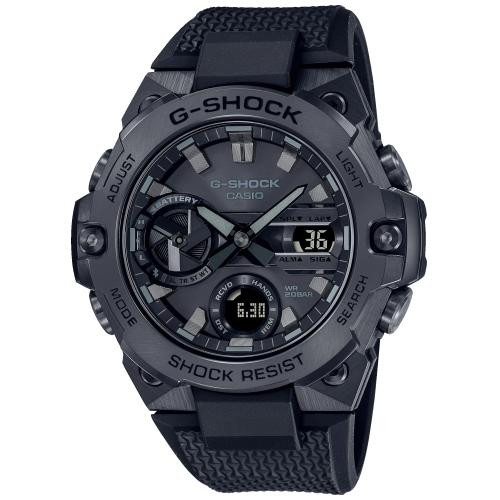
Casio module 3246: user manual and setup (GST-B400)
The module number is engraved on the case back of the watch. It usually sits in a small rectangle next to the other markings. If it says 3246, this guide is for your watch. According to the Casio manual, the procedures for modules 3173 and 3246 are the same.
Which watches have module 3246

Module 3246 is a digital module with solar charging. The dial is a solar cell that charges a built-in rechargeable battery. The built-in sensors measure direction, barometric pressure, temperature and altitude. Depending on the model, the display text is dark on a light background or light on a dark background.
Buttons and modes
The manual labels the buttons with the letters A, B, C, D and E. Button D changes the modes. Button E is held to enter the setting screen and is used to exit it. Buttons A, B and C control the functions in the individual modes.
The modes described in the manual are the following:
- Timekeeping Mode – current time and date;
- Digital Compass Mode – digital compass;
- Barometer/Thermometer Mode – barometer and thermometer;
- Altimeter Mode – altimeter;
- World Time Mode – world time;
- Sunrise/Sunset Mode – sunrise and sunset;
- Stopwatch Mode (STW) – stopwatch;
- Countdown Timer Mode – countdown timer;
- Alarm Mode – alarms and hourly time signal.
The sensor measurements are not of professional or industrial precision. For mountain hikes, Casio recommends a second compass to check the direction.
How to set the time and date
Before first use, the manual lists three checks in the following order.
- Check the battery level. The indicator should show H or M. If it shows L with LOW, C, or a blank display, first charge the watch in light.
- Set the Home City and daylight saving time (DST). In Timekeeping Mode, hold down E. SET Hold appears first, then the city code starts to flash. This is the setting screen.
- Set the current time and date. The time is set as a.m. with no indicator or p.m. with the P indicator.
- Press E to exit the setting screen.
World Time and the sunrise and sunset data depend on the correct Home City, time and date. The full steps for each setting are in the PDF manual below.
Charging and battery level
The watch charges whenever it is exposed to light. When you are not wearing it, leave it in a bright place. When wearing it, make sure your sleeve does not cover the dial, even partially.
The battery indicator has five levels:
- Level 1 (H) and level 2 (M) – all functions work.
- Level 3 (L) – the illumination, the sound and the sensors are disabled. A flashing LOW means that charging is urgent.
- Level 4 (C) – only the time and the charging indicator work.
- Level 5 – all functions stop and the settings return to their factory defaults.
After dropping to level 5 and reaching level 2 (M) again, set the time, date and other settings. The data in memory is also deleted when the battery is replaced. Approximate daily charging times according to the manual:
- Outdoor sunlight (50,000 lux) – about 5 minutes per day.
- Sunlight through a window (10,000 lux) – about 24 minutes per day.
- Daylight through a window on a cloudy day (5,000 lux) – about 48 minutes per day.
- Indoor fluorescent lighting (500 lux) – about 8 hours per day.
The watch can become very hot in direct sunlight, near an incandescent lamp or on the dashboard of a parked car. Excessive heat can darken the liquid crystal display.
Power recovery mode
Many sensor operations, illumination or sound signals in a short time can cause H, M and L to flash. The illumination, alarm, timer, hourly time signal and sensors then stop temporarily. The power recovers in about 15 minutes. If the C indicator also flashes, the battery is very low and the watch needs light quickly.
Power Saving
With Power Saving on, the watch goes to sleep automatically if it is left in the dark. After 60 to 70 minutes the display goes blank, PS flashes and all functions remain active. After 6 or 7 days the functions stop, but the time is still kept. The watch does not go to sleep between 6:00 and 21:59, or in Stopwatch Mode or Countdown Timer Mode.
To wake the watch, move it to a bright place, press a button or tilt it toward your face. The PS indicator is visible in all modes while the function is on.
- In Timekeeping Mode, hold down E until the city code starts to flash.
- Use D to display the Power Saving On/Off screen.
- Use A to switch between On and OFF.
- Press E twice to exit.
Stopwatch
The stopwatch measures elapsed time, split times and two finishes. It shows hours, minutes, seconds and hundredths of a second. Select the mode with D until STW appears on the display. About a second later, the display shows the stopwatch hours.
- Elapsed time: A start, A stop, A resume, A stop, C reset.
- Split time: A start, C split (shows SPL), C split release, A stop, C reset.
- Two finishes: A start, C at the first finish, A stop at the second finish, C shows the second time, C reset.
Alarm and hourly time signal
In Alarm Mode, select an alarm or the Hourly Time Signal with A and C. Use B to turn the selected function on and off. The indicators for an enabled alarm and hourly time signal are visible in all modes. To test the sound, hold down A in Alarm Mode. A sounding alarm is stopped by pressing any button.
The original Casio manual (PDF)
Casio module 3246 manual (PDF, English) is the official Casio document for modules 3173 and 3246.
Casio at Classic. Browse all Casio watches at Classic and the manuals for all Casio modules. The watches can be seen in person at Boutique CLASSIC on Knyaz Boris I 32 and at Mall Varna.