

Casio module 3298: manual and setup (A168)
03.09.2026
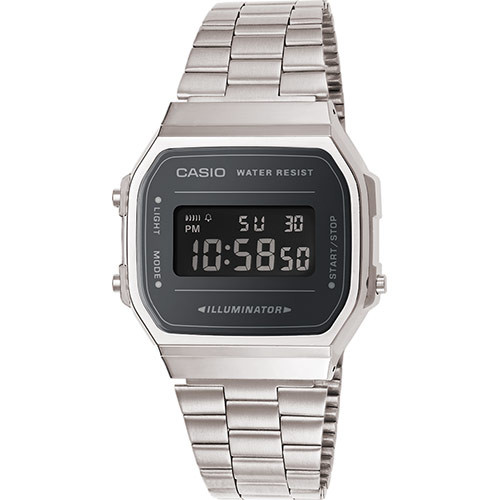
Casio module 3298: user manual and setup (A168WA, A168WEM, A168WEGB)
The module number is engraved on the back cover of the watch. It usually sits in a small rectangle next to the CASIO logo and the serial data. If it says 3298 there, this guide applies to your watch. All steps below follow the official Casio manual for this module.
Which watches use module 3298
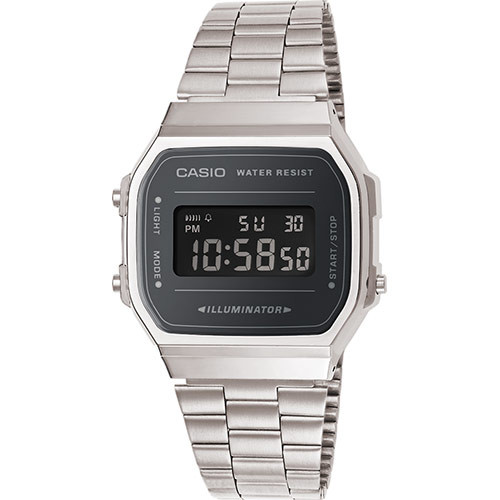
Module 3298 is digital. The display shows hours, minutes, seconds, date, day of the week and a PM indicator. The watch has four modes, a daily alarm, an hourly time signal, a stopwatch and electroluminescent illumination. At Classic the module is found in the Casio Collection A168 series:
- A168WEM-1EF – Casio Collection A168WEM-1EF
- A168WA-1YES – Casio Collection A168WA-1YES
- A168WEGB-1BEF – Casio Collection A168WEGB-1BEF
- A168WEM-7EF – Casio Collection A168WEM-7EF
- A168WEGG-1BEF – Casio Collection A168WEGG-1BEF
- A168WEUC-1AER – Casio Collection A168WEUC-1AER
- A168WG-9EF – Casio Collection A168WG-9EF
- A168WA-3AYES – Casio Collection A168WA-3AYES
- A168WA-8AYES – Casio Collection A168WA-8AYES
- A168WEM-2BEF – Casio Collection A168WEM-2BEF
- A168XESG-9AEF – Casio Collection A168XESG-9AEF
- A168WER-2AEF – Casio Collection A168WER-2AEF
- A168WERG-2AEF – Casio Collection A168WERG-2AEF
Buttons and modes
The watch has three buttons – A, B and C. Each has a clearly defined role.
- A – hold it to turn on the illumination. In the setting modes it selects the flashing field.
- B – switches between modes. After an operation in any mode, pressing B returns to the Timekeeping Mode.
- C – switches between 12-hour and 24-hour format, increases values during setting and controls the stopwatch.
Button B cycles through the modes in this order: Timekeeping Mode, Alarm Mode, Stopwatch Mode and Time Setting Mode. An indicator on the display shows which mode you are in.
The day of the week is shown as an abbreviation: SU – Sunday, MO – Monday, TU – Tuesday, WE – Wednesday, TH – Thursday, FR – Friday, SA – Saturday.
How to set the time and date
- Press B until you enter the Time Setting Mode. The seconds start flashing because they are selected.
- Use button A to select the field to change. The order is seconds, hour, minutes, then day of the week, date and month.
- While the seconds are flashing, press C to reset them to 00. If the seconds are between 30 and 59, the minutes increase by one. At a value from 00 to 29 the minutes do not change.
- For any other flashing field, pressing C increases the value. For the day of the week, C moves to the next day. Hold C for fast change.
- After finishing the setting, press B to return to the Timekeeping Mode.
If you do not press a button for a few minutes while a field is flashing, the watch returns to the Timekeeping Mode by itself. In the Timekeeping Mode, button C switches between 12-hour and 24-hour format. The calendar is automatic, with February set to 28 days.
Alarm and hourly time signal
The daily alarm sounds for 20 seconds every day at the set time. The hourly time signal gives a short beep on every full hour.
- In the Alarm Mode, press A. The hour digits start flashing.
- Use A to switch between hour and minutes. The next press returns to the normal Alarm Mode.
- Use C to increase the selected value. Holding C changes the digits quickly.
- After the setting, press A. The daily alarm turns on automatically.
The alarm format matches the selected time format. In 12-hour format, check whether the hour is morning or afternoon (PM). When the alarm sounds, stop it by pressing A.
Button C in the Alarm Mode changes the status in this order: both on, both off, daily alarm only, hourly time signal only. The display has separate indicators for the alarm on and for the hourly time signal on. To test the sound, hold C in the Alarm Mode.
Stopwatch
The stopwatch measures up to 59 minutes and 59.99 seconds with 1/100-second accuracy. The manual describes three types of measurement:
- Elapsed time: C start, C stop, C restart, C stop, A reset.
- Split time: C start, A split, A release, C stop, A reset.
- Two finishes: C start, A at the first finish, C stop at the second finish, A shows the time of the second, A reset.
While a split time is held, a split indicator lights on the display.
Illumination
Holding A in any mode lights the display. The illumination is electroluminescent (EL). After very long use the light output decreases. Frequent use of the illumination shortens the battery life.
Battery and accuracy
The watch runs on one CR2016 lithium battery. According to Casio it lasts about 7 years with 1 second of illumination and 20 seconds of alarm per day. Accuracy at normal temperature is ±30 seconds per month.
The original Casio manual (PDF)
Casio module 3298 manual (PDF, English) – this is the official Casio document for the module.
Casio at Classic. Browse all Casio watches at Classic or the manuals for all Casio modules. The watches can be seen in person at Boutique CLASSIC on Knyaz Boris I 32 and at Mall Varna.