

Casio module 3443: manual and setup (PRG-300)
03.09.2026
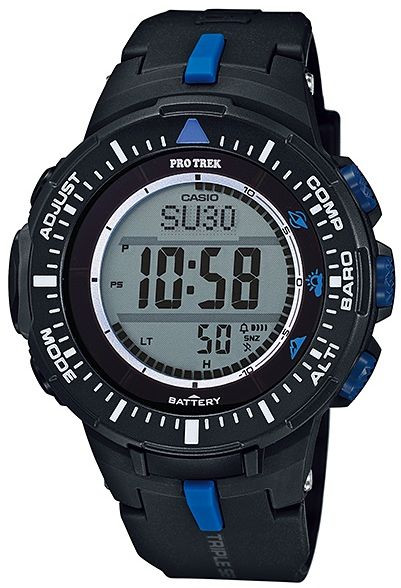
Casio module 3443: user manual and setup (PRG-300)
The module number is printed on the case back of the watch. If it says 3443, the settings described here apply to your model. They follow the official Casio manual for module 3443.
Which watches use module 3443
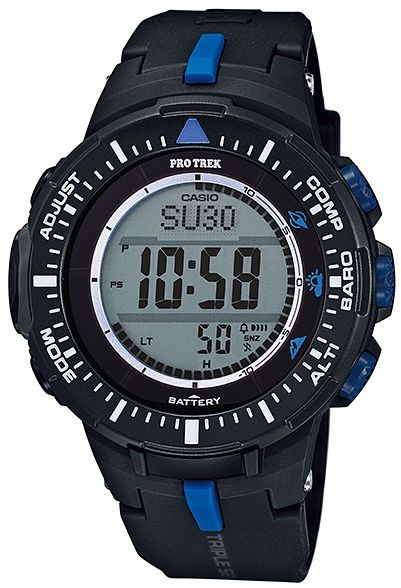
Module 3443 is a digital watch from the Pro Trek series with built-in sensors. The sensors measure direction, atmospheric pressure, temperature and altitude. The watch is charged by light and is intended for hiking, mountaineering and other outdoor activities.
Buttons and modes
In the manual the buttons are marked with letters. The operations described here use buttons A, C, D and E. Button D switches between modes. Button E closes the setting screen. In World Time Mode, A moves east and C moves west.
According to the manual, the watch modes are:
- Timekeeping – current time and date;
- Digital Compass – measuring direction;
- Barometer and Thermometer;
- Altimeter Mode – altitude;
- altitude records;
- Sunrise/Sunset Mode – sunrise and sunset;
- Stopwatch Mode – stopwatch;
- Countdown Timer Mode – countdown timer;
- Alarm Mode – alarm;
- World Time Mode (WT) – world time.
Before first use, the manual recommends three checks. First, the battery must be charged. Second, set the Home City and daylight saving time. Third, set the current time.
How to set the time and date
- Check the battery indicator. At "H" or "M" the watch is charged enough.
- If "L" and "LOW" are flashing, "CHG" is flashing or the display is blank, first charge the watch in light.
- Set the Home City and the daylight saving time (DST) setting. The procedure is "To configure Home City and summer time settings" on page E-20 of the manual.
- Then change the current time and date. The procedure is "To change the current time and date settings" on page E-22.
- The setting is made from the setting screen in Timekeeping Mode.
World Time and sunrise and sunset depend on the Home City, time and date. That is why these settings must be accurate.
Charging and battery
The dial is a solar panel that produces energy from light. It charges a built-in rechargeable battery. The watch charges whenever it is exposed to light.
- When you are not wearing the watch, leave it in a place exposed to light.
- Charging is more efficient in stronger light.
- When you wear the watch, the sleeve should not cover the dial.
- If the dial is covered even partially, the watch may enter a sleep state.
The battery indicator shows "H" or "M" when the charge is sufficient. Low charge is shown by flashing "L" and "LOW", flashing "CHG" or a blank display. The manual also contains a warning about leaving the watch in strong light for charging. The details are in the PDF file. There is also a procedure for recovering from the sleep state.
Compass: measuring direction
Before using the compass, perform bidirectional calibration. Without it, the direction readings may be wrong. The manual also describes magnetic declination correction. There is a Bearing Memory that saves a measured angle. With it you can orient a map, find your position and determine the direction to a target. When mountaineering and in dangerous situations, always check the direction with a second compass.
Barometer and thermometer
The watch measures atmospheric pressure and temperature. You can turn a pressure change alert on or off. The pressure and temperature sensors can be calibrated. The units for temperature, pressure and altitude are set separately.
Altimeter and altitude records
Altimeter Mode calculates relative altitude from changes in atmospheric pressure. Before climbing, set a reference altitude, otherwise the readings will probably not be accurate. The manual describes the choice of screen format and the auto measurement interval. There is also a function for altitude difference from a starting point. Readings can be saved manually. The trek log is started and stopped separately. Records are viewed in a separate mode and can be deleted entirely or by memory area. The manual also contains instructions for measuring altitude and temperature at the same time.
Sunrise and sunset
Sunrise/Sunset Mode shows the time of sunrise and sunset. You can check the times for a specific date or a specific location. The data depend on a correctly set Home City, time and date.
Stopwatch
Stopwatch Mode measures elapsed time. There is a split time function and a function for timing two finishes.
Countdown timer
In Countdown Timer Mode you set a start time from which the countdown begins. An alarm sounds when it reaches zero. Stopping it is described in the manual.
Alarm and hourly time signal
The alarm is set in Alarm Mode. The time is entered as a.m. (no indicator) or p.m. (P indicator). You exit the setting screen with button E. Setting a time turns the alarm on automatically. The Hourly Time Signal is turned on and off separately. A sounding alarm is stopped by pressing any button.
There is also a snooze alarm. It sounds up to seven times at about five-minute intervals. While it is active, SNZ flashes on the display. The snooze alarm is cancelled if you turn it off, open its setting screen or open the time setting screen. It is also cancelled when you change the Home City daylight saving time setting through World Time Mode, when the two cities are the same.
World Time
World Time Mode shows the time in one of 31 time zones with 48 cities. The selected city is called the World Time City. You enter the mode with button D, and WT appears on the display. One second later the city code scrolls once across the top of the display. Use A to move east and C to move west. Standard time or daylight saving time can be set for each city. The display also shows the current time from Timekeeping Mode.
Illumination
The illumination is turned on manually. The illumination duration can be changed. There is also an auto light switch, which is turned on and off.
Other settings
The button operation tone can be turned off. The Power Saving function is also turned on and off. The manual contains a troubleshooting section and technical specifications. The measurement functions are not intended for professional or industrial precision. The readings are for reference only.
The original Casio manual (PDF)
Casio module 3443 manual (PDF, English) – this is the official Casio document with the full procedures and the pages cited above.
Casio at Classic: browse all Casio watches at Classic or the manuals for all Casio modules. There are two stores: Boutique CLASSIC on Knyaz Boris I 32 and Mall Varna.