

Casio module 3583: manual and setup (WS-1800)
04.09.2026
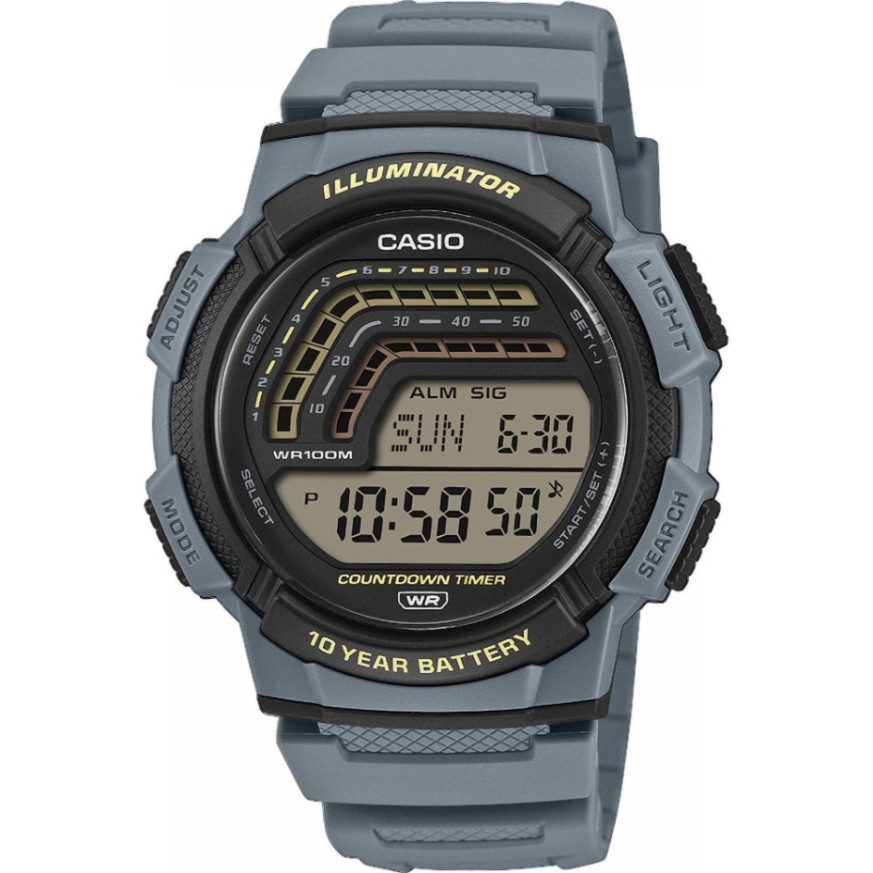
Casio module 3583: user manual and setup (WS-1800)
The module number is engraved on the case back, among the other markings. It is different from the model number of the watch. If the case back says 3583, this manual applies to your watch.
Which watches use module 3583

Module 3583 is digital. The display shows the day of the week, month and date, hours, minutes, seconds and a PM indicator. The watch has a stopwatch, a preset timer, a countdown timer, World Time and an alarm.
Buttons and modes
The manual labels the buttons with the letters A, B, C and D. Button C moves from one mode to the next. In every mode, except on a setting screen, button B turns on the display illumination.
Pressing C changes the modes in the following order:
- Timekeeping – current time and date
- Stopwatch – elapsed time measurement
- Preset Timer – timer with preset times
- Countdown Timer – timer with countdown
- World Time – time in another city
- Alarm – daily alarm
After Alarm Mode the watch returns to the current time.
How to set the time and date
The time in Timekeeping Mode and in World Time Mode is linked. So first select a city code for your Home City, then set the time and date. The city codes are in the table at the end of the manual.
- In Timekeeping Mode, hold down A until the seconds start to flash. This is the setting screen.
- Use C to move the flashing in the following order: seconds, DST, city code, hour, minutes, year, month, day.
- While the seconds are flashing, press D to reset them to 00.
- On the DST screen, press D to switch between Daylight Saving Time (On) and Standard Time (OFF).
- For the city code, use D for east and B for west.
- For hour, minutes, year, month and day, use D (+) and B (–).
- Press A to exit the setting screen.
Daylight Saving Time (DST)
Daylight Saving Time moves the displayed time one hour ahead of Standard Time. Not all countries and regions use it. To switch, hold down A in Timekeeping Mode until the seconds flash. Use C to go to the DST screen, use D to select On or OFF, and exit with A. While Daylight Saving Time is on, the DST indicator is shown on the display.
12-hour and 24-hour format
In Timekeeping Mode, press D to change the format. In 12-hour format, the P indicator appears for times from 12:00 noon to 23:59. Before noon there is no indicator to the left of the hour. In 24-hour format the time is shown from 0:00 to 23:59 without an indicator. The selected format applies to all modes. In Preset Timer, Countdown Timer, World Time and Alarm Modes, the P indicator is not shown next to the current time.
Stopwatch
The stopwatch has an upper and a lower display and is designed for official timing of sports events. The upper display measures up to 59 minutes and 59 seconds. The lower display measures up to 99 minutes and 59 seconds with 1/100-second precision. After the limit is reached, measurement continues from zero until you stop it. Measurement also continues if you exit Stopwatch Mode.
Button D starts, stops and resumes measurement in the upper display. Holding down A resets the stopwatch. The lower display shows the total time since the start and cannot be paused. The difference between the lower and upper displays is the time lost during a stoppage, for example an injury.
Setting an event time
- In Stopwatch Mode, hold down A until the event time starts to flash in the lower display.
- Use D (+) and B (–) to set a time from 1 to 60 minutes, in 1-minute steps. The reading "- -" means no time is set.
- Press A to exit.
When the total time in the lower display reaches the set time, the watch sounds a signal. Measurement continues after that. To reset, stop with D, then hold down A until the initial stopwatch screen appears.
Timer with preset times (Preset Timer)
This mode offers preset start times for countdown: 10, 12, 15, 20, 25, 30, 35, 40 and 45 minutes. When zero is reached, a signal sounds for 10 seconds. There is also auto-repeat, where the countdown restarts from the selected time. In Preset Timer Mode, use A to scroll through the preset times. Use D to start the countdown. Pressing D again pauses it, and the next press resumes it.
Countdown Timer
Besides the preset times, the watch also has a separate Countdown Timer Mode. In it you set your own countdown time and then start the measurement. The steps for setting and operation are described in the Countdown Timer section of the manual, pages EN-23 to EN-29.
World Time
In World Time Mode you see the time for another city code. For each city you can switch between Standard Time and Daylight Saving Time. World Time is linked to the current time, so the Home City must be selected correctly when setting the time. The details are on pages EN-30 and EN-31 of the manual.
Alarm and Hourly Time Signal
In Alarm Mode you set the time of the daily alarm. Once the alarm sounds, the sound can be stopped. The daily alarm and the Hourly Time Signal are turned on and off from the same mode. There is also an option to test the alarm. The full steps are on pages EN-32 to EN-34.
Illumination and button tone
Button B turns on the display illumination in every mode, except when a setting screen is open. The tone that sounds when buttons are pressed can be turned on and off. The procedure is described on page EN-38 in the Reference section.
The original Casio manual (PDF)
Casio module 3583 manual (PDF, English) is the official Casio document with all procedures, the city code table and the care instructions.
Casio at Classic: browse all Casio watches at Classic or the manuals for all Casio modules. You can see the watches in person at Boutique CLASSIC on Knyaz Boris I 32 and at Mall Varna in Varna, Bulgaria.