

Casio module 5582: manual and setup (ECB-900DB)
03.09.2026
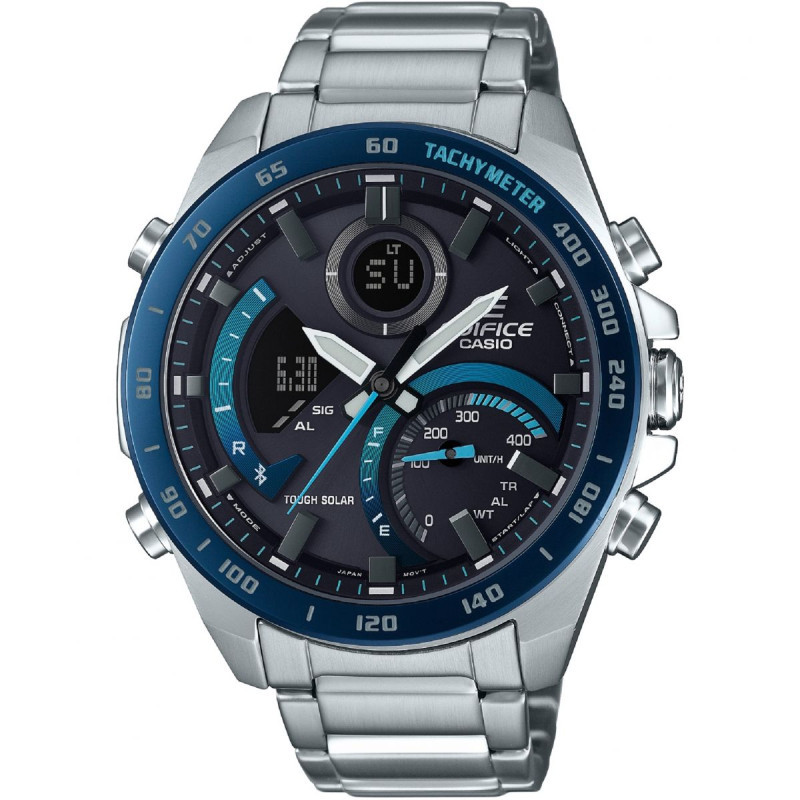
Casio module 5582: user manual and setup (ECB-900DB)
The module number is engraved on the back of the watch case. It is a four-digit number among the other markings on the case back. If it says 5582, this guide applies to your watch. The description follows the official Casio manual for module 5582.
Which watches use module 5582

Module 5582 is a combined analog-digital module. The watch has hour, minute and second hands, a mode hand and a digital display. It is powered by a rechargeable battery charged by a solar panel in the dial. It connects to a phone via Bluetooth through the CASIO WATCHES app. At Classic the module is found in the following model:
Buttons, modes and indicators
The watch has five buttons, marked in the manual with the letters A, B, C, D and E. Their main functions are as follows:
- Button D switches between modes. Holding D for at least two seconds returns the watch to Timekeeping Mode from any mode.
- Button A in Timekeeping Mode changes the content of the digital display. It shows either month, date and day of the week, or hours, minutes and seconds.
- Button E in Timekeeping Mode briefly shows the name of the selected Home City. Pressing E again returns the previous information.
- Holding C for at least 1.5 seconds establishes a connection with the phone.
- Holding B and pressing D moves the hands for better visibility of the display.
There are six modes: Timekeeping (current time), World Time, Stopwatch, Alarm, Recall (viewing records) and Timer (Countdown Timer). The mode hand shows the active mode. In World Time Mode it points to WT, in Alarm Mode to AL, and in Timer Mode to TR.
The display has indicators for afternoon time in 12-hour format, for moved hands, for enabled auto illumination and for daylight saving time. Separate indicators show an enabled alarm and an enabled hourly time signal. In Timekeeping Mode the mode hand shows the battery charge level. When the watch is waiting for a phone connection, the second hand points to R. When a connection is established, it points to the connection symbol.
How to set the time and date
With module 5582 the time is adjusted automatically while there is a Bluetooth connection with the phone. Preparation goes through the following steps:
- Install the CASIO WATCHES app on the phone. Look for it in Google Play or the App Store.
- Set up Bluetooth on the phone according to the instructions in the manual.
- Pair the watch with the phone.
- To connect, hold button C for at least 1.5 seconds. While the connection is active, the watch time is corrected automatically.
- To end the connection, press any button.
Automatic time adjustment works only while the CASIO WATCHES app is running on the phone. The other watch settings are also changed through the app. The manual also describes manual setting of the time and date. It has separate sections for Home City, daylight saving time, 12- or 24-hour format, date format and day of the week language. The exact steps are in the original PDF at the end of the article.
Moving the hands
The hands can cover the digital display. Hold B and press D to move them aside. To return them, hold B and press D again, or press D to change the mode. If you press nothing for about one hour, the hands return by themselves.
Solar charging and battery
When you are not wearing the watch, leave it in a bright place. While wearing it, make sure your sleeve does not cover the dial. Even partial covering reduces charging. When the battery is low, the second hand moves in jumps every two seconds. When the battery is depleted, all hands stop. Expose the dial to light as soon as possible.
When charging begins after a depleted battery, CHARGE appears on the display. The second hand turns counterclockwise and stops at the 57th second. The manual gives the following approximate times for one day of operation:
- Sunny day outdoors (50,000 lux): about 8 minutes.
- Sunny day by a window (10,000 lux): about 30 minutes.
- Cloudy day by a window (5,000 lux): about 48 minutes.
- Indoor fluorescent lighting (500 lux): about 8 hours.
Full recovery from a depleted battery takes more time and depends on the lighting. Do not charge the watch on the dashboard of a car left in the sun, near an incandescent bulb or under direct sunlight for long. The case can heat up and cause a burn.
Power saving function
If the watch stays in the dark for about an hour between 22:00 and 6:00, the display goes blank and level 1 is activated. The second hand stops at 12 o'clock, and the phone connection remains possible. After six or seven days in this state, level 2 is activated. Then all hands stop and all functions are disabled. To wake the watch, press any button or take it into the light.
Stopwatch and record viewing
The Stopwatch measures elapsed time and laps. The manual gives an example of recording a lap time in a race. The measured data is viewed in Recall Mode. While the Stopwatch is running, the mode hand shows the average speed of the current lap. Stopwatch data can also be viewed in the app.
Countdown Timer
The Countdown Timer counts down from a set start time. The start time is set in Timer Mode or through the app on the phone.
Alarms and hourly time signal
The watch has alarms and an hourly time signal. The manual also describes a scheduled alarm for a specific date. Each alarm and the hourly time signal are turned on and off separately. Their status is shown by the indicators on the display. Alarm setting is also possible from the phone.
World Time
World Time Mode shows the time in a selected city. Through the app you can choose among more than 300 cities. The Home City and the World Time city can be swapped. The manual contains a city table and a daylight saving time table.
Illumination
The display is illuminated manually with a button. There is also auto illumination, which can be turned on and off as you choose. The illumination duration is set in the settings.
Other settings
The manual describes hand position adjustment if the hands do not match the display. Button operation tone can be turned on. There is a phone finder function and an option to restore factory settings. When changing phones, pairing is done again.
The original Casio manual (PDF)
Casio module 5582 manual (PDF, English) is the official Casio document with all steps, tables and specifications.
Casio at Classic. Browse all Casio watches at Classic and the manuals for all Casio modules. The watches can be seen in person at Boutique CLASSIC on Knyaz Boris I 32 and at Mall Varna in Varna, Bulgaria.