

Casio module 5601: manual and setup (PRT-B50)
03.09.2026
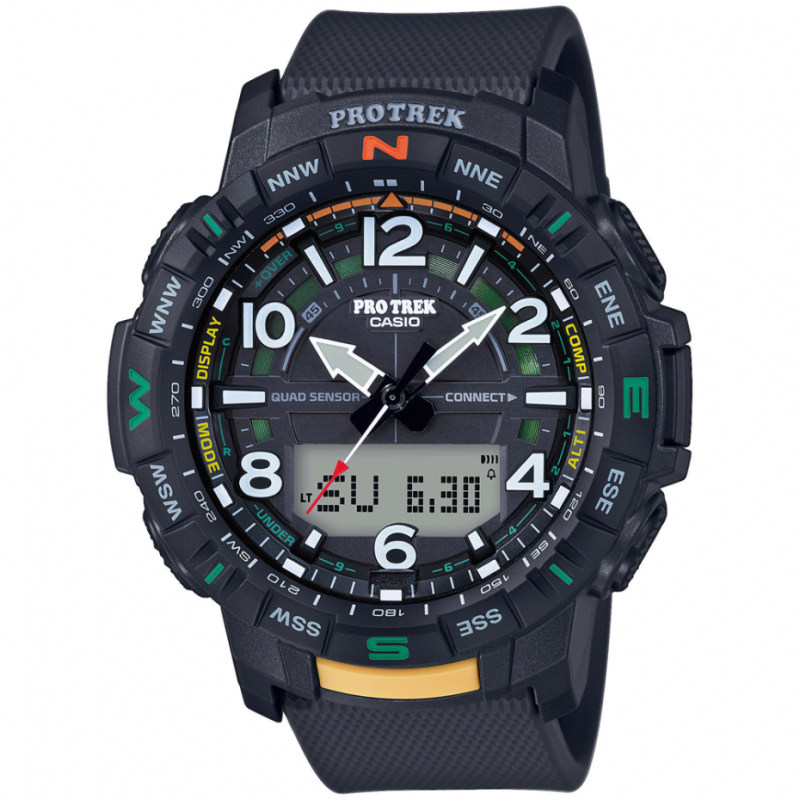
Casio module 5601: user manual and setup (PRT-B50)
The module number is engraved on the case back of the watch, among the other engraved markings. If it says 5601, this manual applies to your watch. The module belongs to the PRO Trek series and includes a digital compass, altimeter, barometer and thermometer.
Which watches use module 5601

The watch is a combination model with analog hands and a digital display. The second hand also shows direction, the phone connection status and the difference in altitude or pressure. The digital display shows the date, step count, graphs and measured values.
Buttons, hands and modes
The manual labels the buttons with the letters A, B, C, D and E. Button E switches between modes. To return to Timekeeping Mode from any other mode, hold E for at least two seconds. According to the diagram, button A leads from Timekeeping Mode to the compass, and button C to the altimeter. In Timekeeping Mode, button D changes the display screens. Button B starts a phone connection to adjust the time. Holding B for about 5 seconds starts the phone finder.
The modes are: Timekeeping, Digital Compass, Altimeter, Barometer, Thermometer, Altitude Record View, Countdown Timer, Stopwatch, World Time, Alarm and Sunrise/Sunset. In the CASIO WATCHES app you can reorder the modes, delete modes or add modes.
The second hand points to R while the watch waits for a phone connection, and to C when a connection is established. In Compass Mode it points north. An indicator flashes while the hands are moved aside for easier reading of the display. The display has indicators for daylight saving time, an enabled alarm, afternoon hours in 12-hour format, auto illumination, an enabled Route Log, the pressure trend, measurement units and the hourly time signal.
How to set the time and date
- Install the CASIO WATCHES app on your phone and pair the watch with it. Pairing is required for all operations through the app.
- Return the watch to Timekeeping Mode by holding E for at least two seconds.
- Press B. The watch connects to the paired phone and corrects the time. The second hand points to R while waiting and to C when connected.
- The manual also describes automatic time adjustment, as well as manual setting with the watch buttons. The exact steps for manual setting are in the section "Using Watch Operations to Adjust the Time Setting" of the PDF file.
The watch settings also include changing the Home City and setting daylight saving time. The manual also has sections on use in medical facilities and aircraft, and on unpairing when changing phones.
Timekeeping Mode and display screens
This mode shows the current time and date. Button D cycles through the screens: day of the week, month and day; daily step count; pressure graph with month and day; hours, minutes and seconds. In CASIO WATCHES you can add the year, month and day, the pressure graph, World Time hours and minutes, and sunrise and sunset for the Home City. The items can be removed and reordered.
Digital compass
This mode gives the direction and the azimuth angle. The second hand points north, and the display shows the direction and angle at 12 o'clock. The watch is not a specialized measuring instrument, and the readings are for orientation only. On a serious hike, carry another compass as well. If the readings differ, perform figure 8 calibration or two-point calibration. Readings are not reliable near magnets, metal objects, high-voltage and overhead cables, and household appliances. The manual also describes calibration for true north using magnetic declination.
Altimeter, barometer and thermometer
The altimeter calculates relative altitude from the pressure sensor data. The values may differ from the actual altitude, so regular calibration against local markers is recommended. The screen shows the altitude difference or seconds, a graph and the current altitude, with an option for a new measurement. Records are viewed in Altitude Record View Mode, where you can delete one or all records. The manual also describes automatic measurement at an interval, automatic calibration and measurement units.
The barometer shows the pressure difference, a graph and the current value. You can track the change over time and between two measurements, as well as a trend indication. The thermometer shows the current temperature. All three sensors have offset calibration and a choice of measurement unit.
Stopwatch and Countdown Timer
The Stopwatch measures elapsed time and split time. The Countdown Timer counts down from a set start time. The start time is set in Countdown Timer Mode.
Alarms and hourly time signal
The manual describes setting the alarms, enabling the hourly time signal and turning them off. When an alarm is enabled, an indicator appears on the display. A separate indicator is shown when the hourly time signal is enabled.
World Time
This mode shows the current time in 38 cities and UTC (Coordinated Universal Time). You can swap the Home City with the World Time city, set daylight saving time and select UTC as the World Time city.
Step counter, sunrise and sunset, location
The step counter counts steps and shows them in Timekeeping Mode. The manual lists reasons for an inaccurate step count. Sunrise/Sunset Mode shows the times for today or for a selected day. The Location Memory function records the current location, and the second hand then shows the direction to it. Route Log records points along the route and their altitude.
Illumination, hands and battery
The manual describes reading the display in the dark and auto illumination with an indicator on the display. The hands can be moved aside for better visibility, and their alignment is corrected in a separate section. There is a setting for the button operation tone and a reset to factory settings. When the battery is low, an indicator flashes and some functions stop. If the flashing continues, replace the battery at a CASIO service center or at the retailer.
The original Casio manual (PDF)
Casio module 5601 manual (PDF, English) is the official Casio document with the full steps for all functions.
Casio at Classic: browse all Casio watches at Classic or find the manuals for all Casio modules. You can see the watches in person at Boutique CLASSIC on Knyaz Boris I 32 and at Mall Varna.