

Casio module 5641: manual and setup (GBA-900, GBA-900UU)
03.09.2026
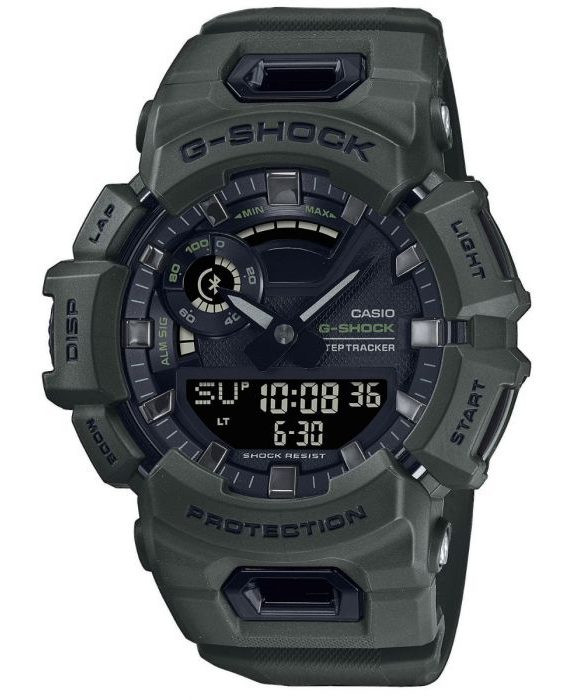
Casio module 5641: user manual and setup (GBA-900, GBA-900UU)
The module number is printed on the case back of the watch. It is a four-digit number in a small rectangle next to the other markings. If it says 5641, the settings below apply to your watch.
Which watches use module 5641
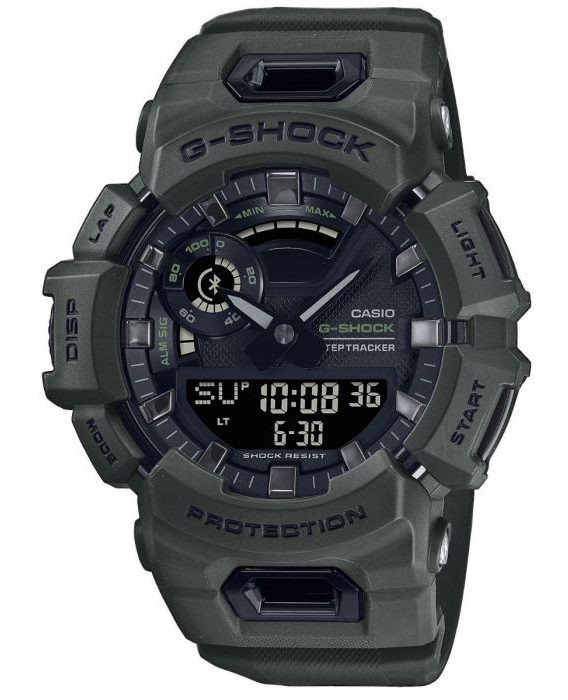
Module 5641 is a combined analog-digital G-Shock module. The hands show the time, and the digital display shows the day of the week, hour, minutes, seconds, month and date. The watch has a graphic area on the display, a step counter (Life Log), a stopwatch, a timer, dual time, alarms and a Bluetooth connection to a phone. At Classic this module is found in the following models:
- GBA-900UU-3AER – Casio G-Shock GBA-900UU-3AER
- GBA-900UU-5AER – Casio G-Shock GBA-900UU-5AER
- GBA-900-1AER – Casio G-Shock GBA-900-1AER
Buttons and modes
The manual labels the buttons with the letters (A), (B), (C), (D) and (E). Each press of (D) switches to the next mode. To return to Timekeeping Mode from any other mode, hold (D) for at least two seconds.
- Timekeeping – current time and date. Button (C) shows the Life Log data: distance, calories and step count.
- Alarm – alarms and hourly time signal.
- Stopwatch – stopwatch for measuring elapsed time.
- Timer – countdown from a selected start time.
- Dual Time – a second time in addition to the time at your current location.
- Recall – review of recorded split times and laps.
The display also has indicators. [ALM] means an alarm is on, [SIG] means the hourly time signal is on. [LT] appears when Auto Light is on, [DST] when daylight saving time is on. [P] means afternoon time, [HND] shows shifted hands, [REC] is lit in Recall Mode. The Bluetooth symbol appears when there is an active connection to a phone.
How to set the time and date
The manual describes two ways to set the time. The first is automatic adjustment via a paired phone (Mobile Link). The second is manual setting with the buttons on the watch. Adjustment via phone works like this:
- Enter Timekeeping Mode. If you are in another mode, hold (D) for at least two seconds.
- Hold (E) for at least two seconds. The watch connects to the paired phone and adjusts the time.
For this function the watch must first be connected to the phone through the CASIO WATCHES app. Manual setting of the time and date is described in the PDF manual in the section "Time Adjustment". Changing the Home City and daylight saving time are in the section "Configuring Watch Settings". If you hold (E) for at least five seconds in Timekeeping Mode, the watch searches for the paired phone (Phone Finder).
Profile and Life Log
The watch counts steps and calculates distance and calories. For more accurate values, first enter a profile: height, weight, gender and date of birth. The profile cannot be changed while the stopwatch is measuring.
- Enter Timekeeping Mode and hold (A) for at least two seconds. Release the button when [SET] stops flashing.
- Press (A). The screen for the target distance unit appears.
- Press (D) five times. The screen for the height unit appears.
- Use (E) to select [cm] or feet and inches. Press (D).
- Use (E) and (B) to enter your height. For feet and inches, enter the inches as well. Press (D).
- Use (E) to select [kg] or [lb]. Press (D).
- Use (E) and (B) to enter your weight. Press (D).
- Use (E) to select [M] (male) or [F] (female). Press (D).
- Use (E) and (B) to enter your year of birth. Press (D).
- Enter the month and day of birth in the same way. Press (D) between the steps.
- Press (A) to complete the setting.
If you have selected Tokyo as the Home City through CASIO WATCHES, the units are fixed to centimeters and kilograms. In this case the unit selection screen is not shown. The [STEPS] indicator is lit when the step count is displayed. [km] or [mi] appears for distance, [kcal] or [kJ] for calories.
Stopwatch and Recall
The stopwatch shows minutes, seconds and hundredths of a second, as well as the measured distance and pace. It has functions for start and stop, split time, lap and reset. When Auto Lap is on, graphic indicator A shows the progress of each lap by distance. When Auto Lap is off, it shows the seconds of the elapsed time. In Recall Mode you review the records: month and date of the measurement, start time, total distance and total time.
Timer
The timer counts down from a selected start time. The display shows the remaining time, the minutes and seconds of the timer and the timer number. There are buttons for start and stop, reset and turning on Auto Start. Graphic indicator A shows what percentage of the countdown remains. The manual also describes an interval timer and programmable timers.
Dual Time
Dual Time Mode shows a second time in addition to the time at your current location. The display shows the seconds of the current time, the local time and the dual time. The two times can be swapped. The movement of graphic indicator A is synchronized with the seconds of Dual Time.
Alarms and hourly time signal
The watch has five alarms. When the set time is reached, it sounds a tone. When an alarm from 1 to 5 is on, the corresponding segment of graphic indicator B is shown. The hourly time signal is turned on separately and is marked with [SIG] on the display.
Illumination
The dial can be illuminated for reading in the dark. There is also an Auto Light function, marked with [LT] on the display. The manual also describes shifting the hands for easier reading of the display, marked with [HND].
Battery
When the battery is low, the battery indicator starts flashing and some functions are turned off. If the flashing continues, the battery must be replaced. Casio recommends having the replacement done at a Casio service center or at the retailer where the watch was purchased.
The original Casio manual (PDF)
Casio module 5641 manual (PDF, English) is the official Casio document with the full description of all functions.
Casio at Classic: browse all Casio watches at Classic and the manuals for all Casio modules. The watches can be seen in person at Boutique CLASSIC on Knyaz Boris I 32 and at Mall Varna.