

Casio module 5686: manual and setup (Edifice ECB-30D)
04.09.2026
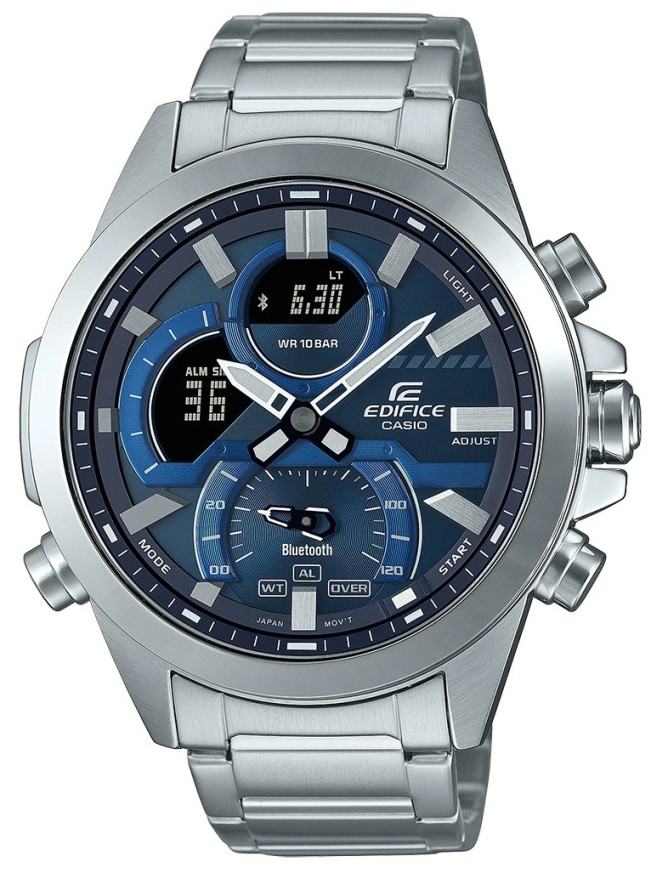
Casio module 5686: user manual and setup (ECB-30D)
The module number is engraved on the case back of the watch, next to the other markings. It is a four-digit number and differs from the model name. If the case back says 5686, the functions described here apply to your watch. The source is the official Casio manual from 2022.
Which watches use module 5686

Module 5686 is a combination module: the watch has analog hands, a separate mode hand and a digital display. When needed, the hands move aside so the display under them can be read. The watch connects to a phone through the CASIO WATCHES app and corrects the time automatically. At Classic the module is found in the Edifice ECB-30D series:
Buttons, mode hand and modes
In the manual the buttons are marked with letters in brackets. Button (D) starts and stops measurement in the Stopwatch. Button (B) records lap times, resets the Stopwatch and opens the Countdown Timer setting. The mode hand shows which mode the watch is in. In the Stopwatch it also points to the seconds of the lap time.
Besides the current time, the watch has modes for World Time, Alarm, Stopwatch and Countdown Timer. Switching between them is described in the section "Navigating Between Modes" of the manual. In Timekeeping Mode the digital display can show different content, which changes in a cycle.
How to set the time and date
The manual gives two ways to set the time: through the CASIO WATCHES app or directly on the watch.
- Install the CASIO WATCHES app on your phone and pair the watch with it. The list of supported phones is at the end of the manual.
- When connected, the watch receives automatic time correction from the phone. This way the time and date are adjusted without manual input.
- Set the Home City and the daylight saving time setting through the app. The date format and the language for the day of the week are also changed there.
- Without a phone, the time can also be set on the watch itself. The steps are in the section "Using Watch Operations to Adjust the Time Setting" of the PDF document.
- If the hands do not match the digital time, perform hand alignment. The setting is available both from the app and from the watch.
World Time
World Time Mode shows the time in a city selected from the city table in the manual. The city is set from the CASIO WATCHES app or from the watch itself. The Home City time and the World Time can be swapped, which is convenient when travelling. The manual also describes a separate procedure for moving to another time zone. The daylight saving time table is at the end of the document.
Alarm and Hourly Time Signal
The alarm is set from the app or from the watch in Alarm Mode. Separately, the Hourly Time Signal can be turned on to mark every full hour. The manual also describes how to stop a sounding alarm or the Hourly Time Signal.
Stopwatch
The Stopwatch measures elapsed time and lap times. During the first hour the display shows minutes, seconds and thousandths of a second. After the first hour it shows hours, minutes, seconds and tenths of a second.
- Button (D) starts and stops measurement.
- Button (B) during measurement records a lap time in the watch memory. Lap times are recorded with an accuracy of 1/1000 second.
- The mode hand points to the seconds of the lap time. If more than 120 seconds have passed since the start, it points to the OVER marking.
- Button (B) after stopping resets the Stopwatch.
The recorded data can be reviewed later. The manual includes an example of timing laps in a race.
Countdown Timer
The countdown start time is set in one-second steps, up to 24 hours. To set it, enter Countdown Timer Mode and hold button (B) for at least two seconds. If a countdown is running, first return the timer to its start time. The Countdown Timer settings can also be made from the CASIO WATCHES app.
The watch also has a Schedule Timer, which is used through the app. Its notification sound can be turned on and off.
Phone connection and Phone Finder
The phone connection is made through CASIO WATCHES. The manual describes pairing, connecting and unpairing. When changing phones, new pairing is required. The Phone Finder function helps you locate your phone from the watch. In a medical facility or on an aircraft, follow the wireless connection guidance in the manual.
Illumination and other settings
The manual has a section on reading the dial in the dark. The button operation tone can be turned on or off. There is also a function for returning all watch settings to their initial values.
Battery and watch care
Battery replacement requires special tools. Entrust it to the store where the watch was bought or to an authorized Casio service center. During replacement the technician also checks the water resistance. The gaskets are replaced periodically, about every two to three years.
The water resistance rating is marked on the case back or on the dial. Do not press the buttons while the watch is wet or under water. Keep it away from strong heat, low temperatures, solvents and cosmetics. The band should not be fastened too tightly, a finger should fit between it and the wrist.
The original Casio manual (PDF)
Casio module 5686 manual (PDF, English) is the official manufacturer document with all steps and tables.
Casio at Classic. Browse all Casio watches at Classic or the manuals for all Casio modules. The watches can be seen in person at Boutique CLASSIC on Knyaz Boris I 32 and at the store in Mall Varna.