

Casio module 5698: manual and setup (ECB-2000D, ECB-2000DC)
04.09.2026
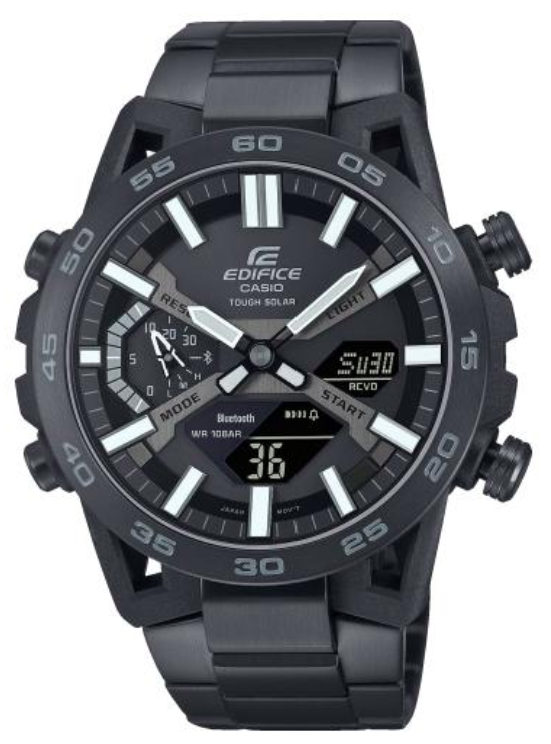
Casio module 5698: user manual and setup (ECB-2000D, ECB-2000DC)
The module number is engraved on the back of the watch, usually in a small rectangle next to the other markings. If it says 5698, this guide applies to your watch. The case model may differ, but the functions and buttons are the same for all watches with this module.
Which watches have module 5698
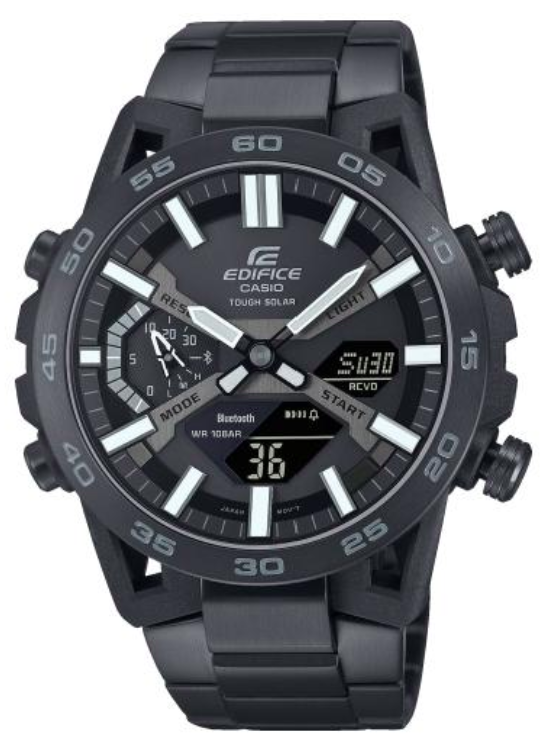
Module 5698 is a combination module: the watch has hands and a digital display. The manual describes how the hands move aside so you can read the display beneath them. The watch charges, shows the charge level and connects to a phone through the CASIO WATCHES app. At Classic, the following Edifice models have this module:
- ECB-2000DC-1BEF – Casio Edifice Solar Bluetooth ECB-2000DC-1BEF
- ECB-2000D-1AEF – Casio Edifice ECB-2000D-1AEF Watch
- ECB-2000DC-1AEF – Casio Edifice Solar Bluetooth ECB-2000DC-1AEF
Buttons and modes
The watch has four buttons, marked in the manual with the letters A, B, C and D. In the setting screens, B and D change the value, and holding them scrolls quickly. Button C moves to the next position, for example from minutes to seconds. Button A exits the setting. If you press nothing for about two to three minutes, the watch leaves the setting screen on its own.
The main mode is Timekeeping Mode. The manual also describes World Time, Alarm, Stopwatch and Countdown Timer modes. In Timekeeping Mode, the display content can be cycled.
How to set the time and date
- Install the CASIO WATCHES app on your phone and pair the watch with it as described in the manual.
- When connected, the watch receives the exact time automatically through the auto time adjustment function.
- If you do not have a phone at hand, the time can also be set manually with the watch buttons. The steps are in the section "Using Watch Operations to Adjust the Time" of the manual.
- The date format and the day-of-week language are changed in the watch settings.
- If the hands do not match the digital time, use the hand home position correction. It is done from the app or directly on the watch.
Phone connection
The manual describes preparation, connecting, disconnecting and unpairing. If you change your phone, the watch must be paired again. The app is used to set World Time, the alarm, the timer and the hand positions. The Phone Finder function helps you locate your phone. TIME & PLACE records your current location. There is also a separate section with precautions for using Mobile Link, including on aircraft and in medical facilities.
World Time
The watch shows the time in a second city from the city table. The city is selected from the app or on the watch itself. The Home City and the World Time city can be swapped, which is convenient when travelling. Daylight saving time can also be set for the Home City. The full city table and daylight saving time details are at the end of the manual.
Alarm and hourly time signal
The digital alarm is set from the app or on the watch. Separately, an hourly time signal can be turned on, which sounds on every full hour. The manual also describes how to turn off the alarm or the hourly time signal. There is an indicator for the time remaining until the alarm.
Stopwatch
In Stopwatch Mode, button D starts and stops the measurement. Button A records a lap while it is running. During the first hour, the time is shown to 1/100 of a second. After the first hour, the reading is in hours, minutes and seconds. Press A while the stopwatch is stopped to reset it. The manual describes measuring elapsed time, split time and laps, as well as reviewing the recorded data.
Countdown Timer
- Enter the screen for setting the timer start time.
- Use B and D to set the minutes. Holding them scrolls quickly.
- Press C to move to the seconds, which start flashing.
- Use B and D to set the seconds.
- Press A to exit the setting.
If you set 00'00, the timer counts down 60 minutes. The start time can also be set from the app. The sound at the start of the countdown can be turned off in the settings. The watch shows an indicator for the remaining time.
Charging and charge level
The manual has a section on charging and on checking the charge level. There are also settings for the power saving function. Replacing the battery requires special tools. For this reason, Casio recommends that it be done by the retailer or an authorised service centre.
Illumination and other settings
The section "Viewing the Face in the Dark" explains how to read the dial in the dark. The button operation tone can be turned on in the settings. All settings can be returned to their initial state with the reset function.
Water resistance and care
Do not press the buttons or turn the crown while the watch is wet or under water. After sea water, rinse with clean water. Casio recommends replacing the gaskets about every two to three years. Avoid hot baths, saunas and contact with solvents, cosmetics and cleaning agents. Do not leave the watch on a car dashboard or next to a heater. If the glass fogs up and does not clear quickly, take the watch to a service centre.
The original Casio manual (PDF)
Casio module 5698 manual (PDF, English) is the official Casio document with the full steps, the city table and the specifications.
Casio at Classic. Browse all Casio watches at Classic and the manuals for all Casio modules. The watches can be seen in person at Boutique CLASSIC on Knyaz Boris I 32 and at Mall Varna.