

CASIO MODULE 3502 MANUAL - AE-1500WH SETUP GUIDE
23.08.2026

Casio module 3502: how to set the time, the alarm and the backlight on an AE-1500WH
If the case back of your Casio reads module 3502, this is the guide you need. Below are the operations people look for most often – setting the time, switching between 12 and 24 hours, silencing an alarm and turning on the backlight – plus Casio’s own manual as a PDF at the end.
Which watches use module 3502

Module 3502 is the movement inside the Casio Collection AE-1500WH family: large digital models with a ten-year battery and 100 m water resistance. The module number is printed on the case back, under the model code. If it says 3502, everything below applies to your watch.
The four buttons, and what the manual calls them

Casio’s manual refers to the buttons by letter, while the watch itself has words moulded into the case. They line up like this:
- A – ADJUST, upper left. Opens the setting screen.
- B – LIGHT, upper right. Backlight.
- C – MODE, lower left. Moves from mode to mode.
- D – START, lower right. Changes the value that is flashing.
Keep that in mind and the rest of the manual reads easily.
How to set the time and date
- In Timekeeping Mode, hold ADJUST (A) until the seconds start flashing. That is the setting screen.
- Press MODE (C) to step through the settings: seconds, hour, minutes, year, month, day.
- Press START (D) to change whatever is flashing. On the seconds, it resets them to 00 – and if you were between 30 and 59, it adds a minute.
- Press ADJUST (A) to leave the setting screen.
The day of the week follows the date automatically. The calendar covers 2000 to 2099 and handles month lengths and leap years by itself, so once the date is set you should not need to touch it again until the battery is changed.
12-hour or 24-hour
In Timekeeping Mode, press START (D) to switch. In 12-hour format a P appears to the left of the hour between noon and 11:59 p.m. – you can see it on the photos above.
Alarms: setting, testing, turning off
- To stop an alarm that is already sounding, press any button.
- To test an alarm, hold START (D) in Alarm Mode.
- To turn alarms 2 to 5 or the hourly signal on and off: in Alarm Mode select the one you want with START (D), then press ADJUST (A) to toggle it.
This module carries five alarms – that is what the AL1 to AL5 markers along the bottom of the display are for. A small indicator shows which ones are on, and it stays visible in every mode.
Backlight
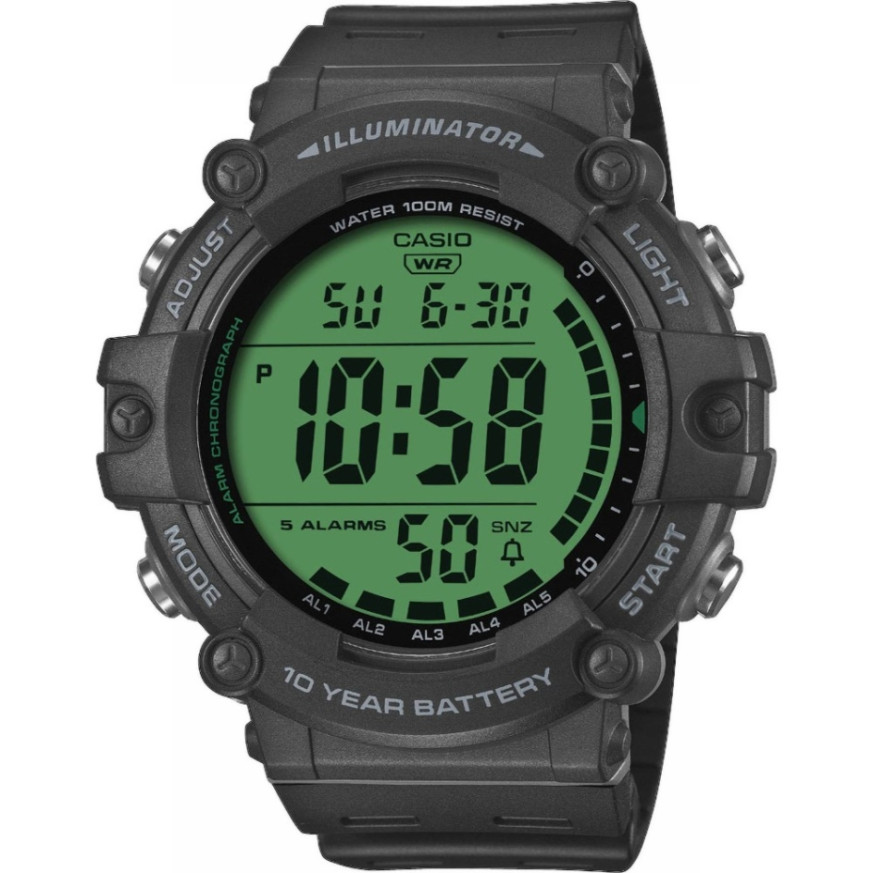
Press LIGHT (B) in any mode and the display lights up for about a second, as in the photo above.
Timer, stopwatch and dual time
The same module also carries a countdown timer, a stopwatch and a second time zone. Press MODE (C) to move from mode to mode, and hold it for about a second to jump straight back to Timekeeping.
The official manual as a PDF
The full Casio Operation Guide 3502, with the reference section, specifications and care instructions, is here: Operation Guide 3502 (PDF).
The watches themselves
We stock three models on this module:
Classic Watches is an authorised retailer with two shops in Varna – Boutique Classic on Knyaz Boris I 32 and Mall Varna.